queuePop
League of Legends & TFT companion

Your queue,
on autopilot.

queuePop accepts the Ready Check the instant it pops, hovers and locks your picks, sets your spells, runes, and skin per champion, and pings your phone when the match is live. You just play.

  • Free & open source
  • No telemetry
  • Windows
  • Official LCU API
  • No input hijacking

Independent fan project, not affiliated with or endorsed by Riot Games.

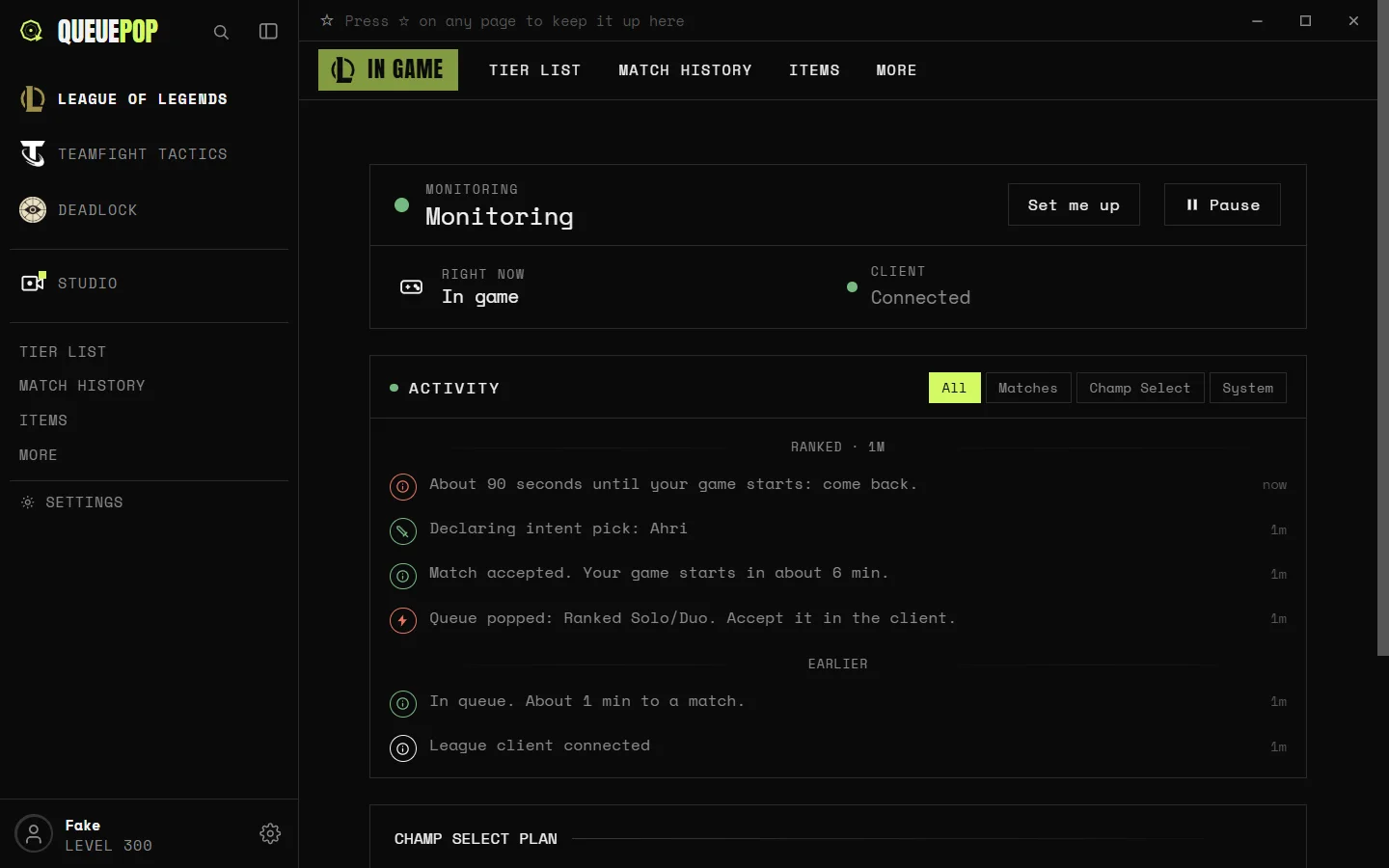
queuePop dashboard, monitoring status, ranked overview, and live activity feed
Ranked Solo/DuoRanked FlexDraft PickQuickplayARAMArenaTFT RankedTFT Double UpHyper RollTocker’s TrialsBlind PickRanked Solo/DuoRanked FlexDraft PickQuickplayARAMArenaTFT RankedTFT Double UpHyper RollTocker’s TrialsBlind Pick

Everything in one place

More than auto-accept

queuePop reads your client through the official LCU API and handles the tedious half of every game, from the Ready Check to lock-in.

Instant Auto-Accept

The Ready Check is gone before you can blink. queuePop accepts the moment your match pops. Go grab a drink, it has the lobby.

Auto Pick & Ban

Per-role ban and pick lists with ordered backups. It hovers early to signal intent, then locks instantly or right before the timer.

Per-Champ Loadouts

Summoner spells, runes, and skin, set once per champion, per role. queuePop applies them automatically on lock-in.

Trades & ARAM Bench

Auto-requests trades for higher-priority champs and grabs upgrades off the ARAM reroll bench, in your preferred order.

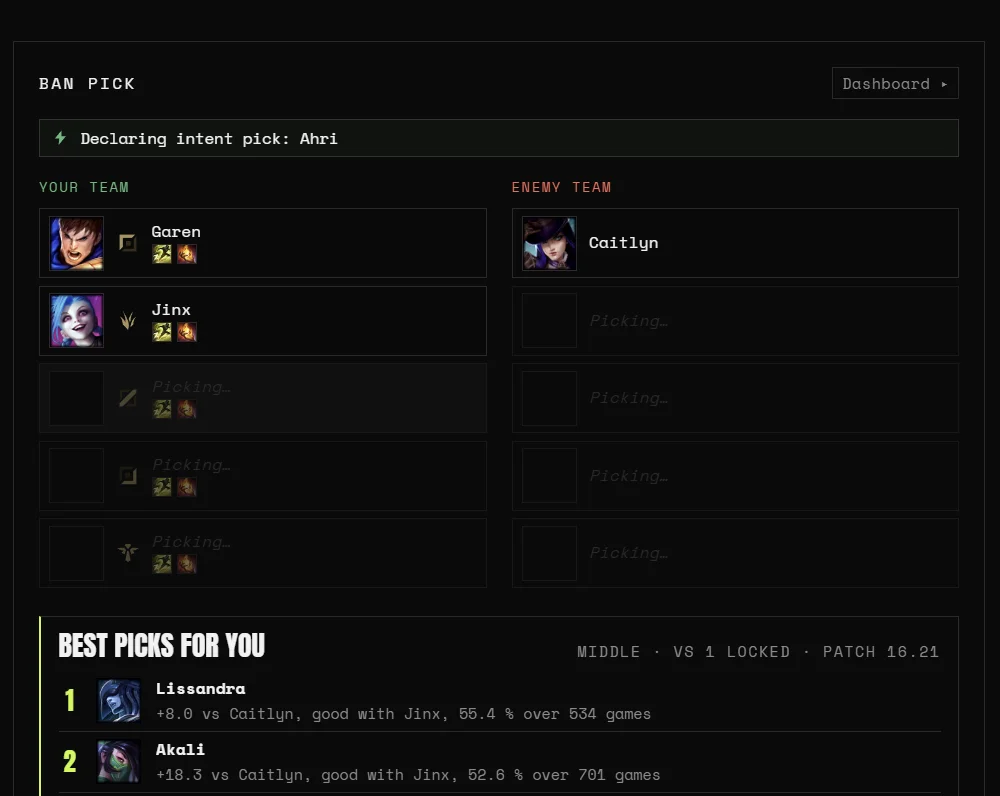
Live Champ-Select View

A real-time board of both teams: intents, locks, spells, skins, bans, pending trades, and a millisecond-accurate phase timer.

Phone Companion

Open one page on your phone, no install. It alarms the instant queue pops, with built-in or custom alert sounds.

Discord Pings

Webhook notifications with an optional @mention, so a queue pop buzzes your phone even when you have tabbed away.

Account Dashboard

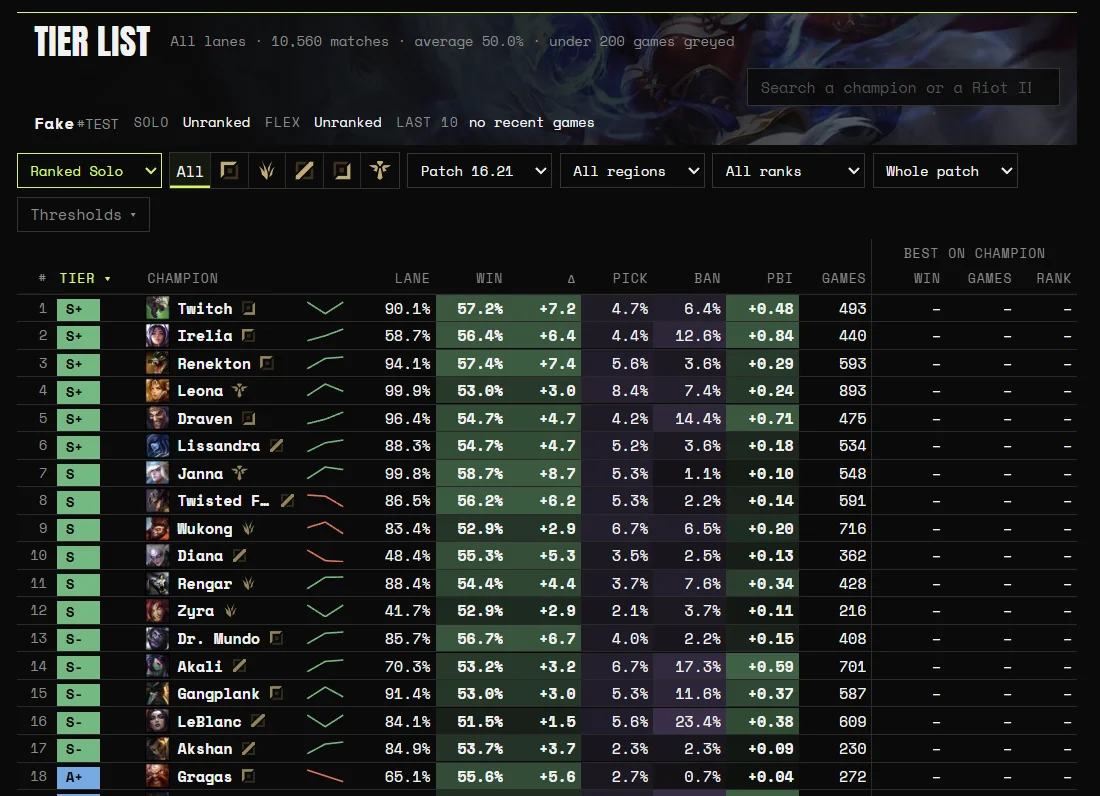
Riot ID, level, Solo/Flex/TFT ranks, top mastery, recent matches, and one-click links to every major tracker.

Up and running in a minute

How it works

01

Download & run

Grab the Windows build, run it, and it tucks itself into your system tray. No admin prompt, no clutter.

02

It connects itself

queuePop talks to your running League client through the official LCU API, no screen-scraping, no mouse or keyboard hijacking.

03

Set picks & queue up

Pick your champs, spells, runes, and skins per role. Hit queue. From the Ready Check to lock-in, queuePop handles it.

Champion select, automated

It plays the pick/ban for you

  • Per-role ban and pick lists with ordered backups when a champ is taken
  • Hovers early to signal intent, then locks instantly or just before the timer
  • Auto-trades for higher-priority champs and grabs ARAM bench upgrades
queuePop champion select, pick list with numbered priority order per role

Set it once

A full loadout for every champion

  • Summoner spells per champion, per role, Flash always on the right side
  • Recommended runes on lock-in, or your own saved page
  • Pick a skin, or let it surprise you from your owned favorites
queuePop per-champion loadout editor, summoner spells, runes, and skin selection

Never miss a pop

Your phone is the second screen

  • Open one page on your phone, no app install, just your home Wi-Fi
  • Alarms the instant queue pops, with built-in or custom sounds
  • Discord webhook pings with an optional @mention as a backup
queuePop

Queue ready!

ARAM · tap to dismiss

Connected

A real app, not a concept

Built to get out of your way

Set it up once, then forget it's there. queuePop lives in your tray and only acts on the queues and champions you tell it to.

queuePop settings, auto pick/ban toggles, phone companion, and Discord webhook

Every toggle in one place

Auto pick/ban, instant-lock, trades, ARAM bench, phone alerts, and Discord, all opt-in.

queuePop PLAY menu, one-click queue launcher with pinned favorites

Queue in one click

Pin your favorite modes, Rift, ARAM, every TFT queue, and launch straight from the app.

queuePop profile, live rank, champion mastery, and recent match history

Your climb at a glance

Live rank and LP, champion mastery, and recent matches, pulled straight from your client.

Yours alone

Private by default.

queuePop is a local tool, not a service. Nothing about you gets collected, and there is no server in the middle.

No telemetry, ever

No analytics, no tracking, no usage data. queuePop never reports anything about you or how you play.

No account, no sign-up

There is nothing to register for and no login. It just runs when you open it.

Local-first

It talks to your own League client over Riot’s official LCU API. Your stats, picks, and config never leave your PC.

Open source

Every line is on GitHub. Do not take my word for it, read it, build it, audit it yourself.

For full transparency: the only outbound connections are ones you choose. The optional Discord ping you set up, and a quick check to GitHub for updates when you launch. That is the whole list.

Why I built it

A friend of mine had a baby and kept missing his queue pops while he was up doing chores or settling the little one. queuePop lets him lock in with friends, get as much done around the house as he can, and still drop into the game right on spawn.

The other half is high-elo TFT, where queues can run 15 minutes or more. Being chained to the desk that whole time feels awful, and you start skipping a bathroom break just in case the game pops. Now I queue up, do a few minutes of real-life stuff, and get a clean alert the second my match is ready.

That is the whole idea. If anything, I think it means fewer dodges and abandoned lobbies, not more.

Straight answers

Questions, honestly answered

Is it really free?

Yes. queuePop is free and open source under the MIT license. If it saves you a few hundred Ready Checks and you want to say thanks, there is a tip jar, but nothing is gated behind it.

Is this an official Riot Games product?

No. queuePop is an independent, fan-made tool. It is not made by, endorsed by, affiliated with, or sponsored by Riot Games. League of Legends and Riot Games are trademarks of Riot Games, Inc.

Will I get banned? Is this against the Terms of Service?

Be aware of the risk and decide for yourself. queuePop uses only the official League Client (LCU) API, it never reads your screen or moves your mouse. That said, automating client actions such as accepting queues or locking picks falls outside what Riot officially sanctions, and Riot can change its stance at any time. Auto-accept is widely used; the deeper automation (auto pick/ban/lock, trades) carries more risk. Use it on an account you are comfortable using it on.

Does it work with TFT and ARAM?

Yes. queuePop detects the mode: Summoner’s Rift, ARAM, Arena, and every TFT queue (Normal, Ranked, Hyper Roll, Double Up, Tocker’s Trials), and only acts on the queues you allow. ARAM gets bench-swapping and trades; Rift gets full pick/ban.

Is it Windows only?

Today, yes, queuePop ships as a Windows installer and a portable build. It runs locally and minimizes to the system tray.

How do updates work?

Both the installer and portable builds check for new releases on launch. When one is available you get a one-click Update banner; the installer updates silently, the portable build swaps its own executable.

Can I see the code?

Absolutely, it is fully open source on GitHub. Read it, audit it, build it from source, or open an issue.

Free forever. Fueled by tips.

queuePop will always be free and open source. If it has saved you a few hundred Ready Checks, a small tip keeps the updates coming, entirely optional, no features locked behind it.